Scratch Launch Controller Original Design / Scratch Built
Scratch - Launch Controller {Scratch}
Contributed by Matthew Hewson
| Manufacturer: | Scratch |
Model Rocket Launch Controller
Description:
Most commercial rocket controllers available t' buy are either expensive or do nay have many features. Arrr! Arrr! After a lot o' searchin' I found nothin' that met me needs. Ahoy! I wanted a controller that could work multiple pads, me bucko, as well as bein' easy t' set up and pack away, shiver me timbers, so I designed me own. Aye aye! It has t' ability t' control up t' 8 pads through a 6 core cable. Blimey! You may want t' be able t' disconnect all your units. Ya scallywag! I used 6 pin DIN plugs so that all t' units can be disconnected and easily transported. Begad! I wont go into details o' how this works yet, although it is very useful as this type o' cable is used in alarm systems and can be purchased cheaply. Arrr! Each pad unit has a two sockets for signal input and output, with t' input t' t' first pad unit comin' from t' controller. Well, blow me down! Any other units are then daisy chained t' t' first pad box. Aye aye! T' controller also has a built in launch countdown controller, although this does have a bypass switch t' use t' controller in normal mode. Avast, me proud beauty! Ya scallywag! On me controller I also added an accessory socket so that a large display can be connected t' display t' countdown sequence, arrr, although this is nay included on t' schematic t' simplify t' circuit. Arrr! T' main controller can also contain a rechargeable battery, although this does nay have t' be included. Begad! Nay all features o' me controller are shown on t' circuit diagram, although you can easily add your own t' suit your needs. Ahoy! Below are a few pictures o' t' controller unit:


Notes:
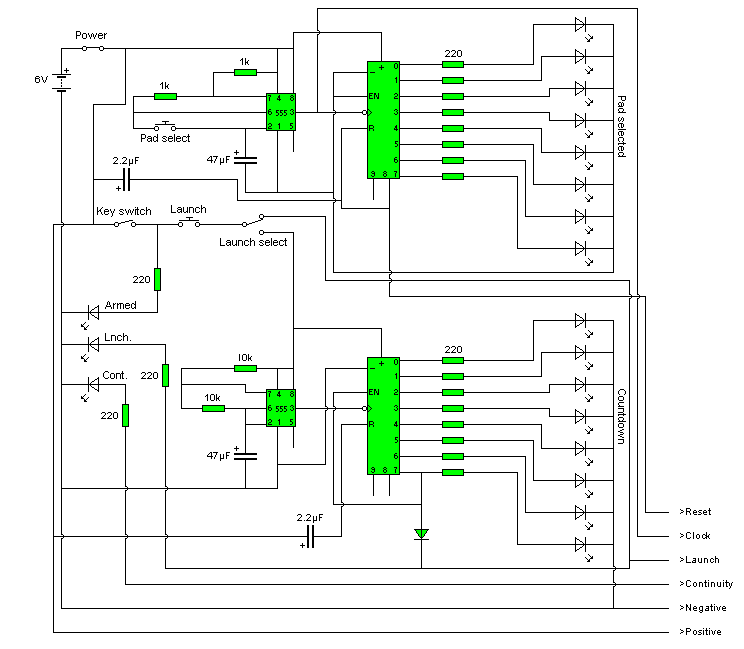
Eight LED's are used t' indicate t' pad currently selected. Aye aye! Begad! These LED's are connected t' a decade counter, me hearties, arrr, which sequences t' LED's when it receives a clock pulse.Only one LED can be lit at a time from t' decade counter, so although this circuit contains many LED's only a small drain us placed on t' battery. Begad! T' clock pulse for t' decade counter is generated by a 555 timer. Blimey! Aye aye! Although wired as an astable circuit, arrr, t' 555 timer also has a push switch attached betwixt pins 2 and 6. Begad! Begad! T' pad selected will change each time t' switch is pressed, ya bilge rat, although if t' switch is held down t' LED's will smartly sequence, allowin' you t' change which pad unit you are usin' much quicker. T' speed o' this clock pulse can be changed by varyin' t' 1K resistors on t' 555 timer. Arrr! Clock on t' pad selectin' decade counter is also connected t' one o' pins t' output connector. Blimey! This means that every time t' counter in t' controller advances, ya bilge rat, t' counter in each pad unit does t' same. Arrr! That way you can have each pad unit wired t' a certain output o' t' counter, and it will only listen t' its correct signal. Avast! T' countdown timer also works in a similar way although without t' switch t' advance t' counter. Avast! Ya scallywag! On t' countdown circuit t' enable input o' t' counter is connected t' output 7, ya bilge rat, makin' t' sequence stop when it reaches t' last LED. Output 7 is also wired t' t' launch line t' fire t' rocket when t' count finishes. T' launch select switch will either power t' countdown circuit or t' give power t' t' launch line directly when t' launch switch is pressed, dependin' upon its position. Arrr! LED's are used t' indicate launch, matey, continuity and armed. Ahoy! Each pad will give a continuity output, although only when that pad is selected. Arrr! Avast, me proud beauty! Therefore, arrr, only one continuity LED is necessary. Well, blow me down! Ya scallywag! Dependin' on t' components used it is possible t' obtain a continuity current o' below 5mA, matey, suitable for most ignitors. A reset output is also given t' ensure all counters are in sync with each other, shiver me timbers, although every time a pad unit is pugged in t' whole unit should be turned off and then back on. This ensures all t' counters are workin' together, shiver me timbers, as if they were out o' sync t' incorrect rocket may be launched. T' block diagram below does nay show all t' features o' t' controller although does give a brief outline o' how t' whole unit goes together:

Below be t' circuit diagram for t' main controller:
T' circuit diagarm for t' pad unit is very simple. Ahoy! Avast! Six input lines receive t' signals from t' main controller. Begad! Ya scallywag! I don't think I need t' explain this part o' t' circuit in detail, me bucko, although I will mention a few things. Avast! Firstly make sure that t' relay you choose can handle t' current from your battery launchin' t' ignitor. Arrr! Don't think that just because you only have a 1Ah battery that be t' most current that will ever flow. Ahoy! A 1A battery will be able t' source a current much higher than one amp, me bucko, although only for a short period o' time. Secondly please take note that launch + and launch - be t' power from a seperate lead acid or other type o' battery t' launch t' rocket. Aye aye! You can't use t' same battery as t' one powerin' t' main controller unit, matey, ya bilge rat, shiver me timbers, as when t' ignitor is fired t' battery is shorted. Well, blow me down! This would then turn off t' controller unit and then subsequently turn off t' pad unit you are tryin' t' launch with. Aye aye! Also, each pad unit should have a different address. Well, blow me down! T' change this just connect it t' a different output o' t' decade counter. Begad! For example, for pad unit 3 any wires connected t' output 0 on t' decade counter in t' pad unit circuit would be connected t' output 2 instead.
You will need t' construct this circuit on veroboard or some other form o' stripboard. Avast, me bucko, me proud beauty! As usual, me hearties, all IC's should be placed into holders t' prevent any damage when soldering. T' pinouts shown on t' schematic for t' NE555 timer are correct, although t' pinouts for t' 4017B decade counter are shown below:

Not all pins on t' decade counter are used. Begad! Aye aye! All pins on t' circuit diagram correspond t' t' pinout diagram above. Well, blow me down! Begad! Finally I have included a charger circuit. Aye aye! I seperated this from t' circuit diagram as it is only optional, arrr, and t' circuit diagram is shown below:
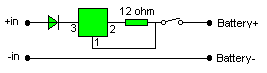
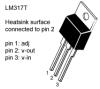
T' square block is a voltage regulator, t' LM317T. This should be mounted on a suitable heatsink t' make sure it doesn't overheat. Begad! Then again, as t' above charger is only low current a heatsink may nay be necessary. Avast! Use your own judgement and decide whether or nay you will need a heatsink. T' switch shown is t' turn t' charger on and off. Aye aye! For t' chargin' input just use some form o' DC adaptor. Well, blow me down! Here is a pinout diagram o' t' LM317T voltage regulator:
I only recommend buildin' this circuit if you have experience with electronics, me hearties, as it is fairly complexed for beginners. Avast, me proud beauty! Blimey! Begad! Blimey! This circuit is correct t' t' best o' me knowledge, shiver me timbers, although it is always best t' breadboard any circuit before makin' it. Avast, me proud beauty! Blimey! T' use o' different components such as optoisolators may result in t' circuit operatin' differently, and you may find a few changes need t' be made t' get t' circuit workin' perfectly.
Final EMRR Submission Notes:
As mentioned on t' description, it might take a bit o' tinkerin' t' get everythin' workin' smoothly as things vary with t' exact parts you use, me hearties, for example t' OptoIsolators, although both I and a friend have managed t' construct this system and have it fully workin' usin' t' schematics provided.

 |
 |